9 Best Makita Cordless Drills (November 2026)
The best best Makita cordless drills include the Makita XFD131 18V LXT Brushless Driver-Drill Kit for new LXT buyers, the Makita CT225SYX 18V LXT Compact 2-Piece Combo Kit for two-tool projects, and the Makita FD09R1 12V CXT 3/8 in. Driver-Drill Kit for light household jobs.
On this page (7 sections)
- How we chose the best Makita cordless drills
- Which Makita drill is right for your work?
- How do you choose between Makita CXT and LXT drills?
- Do you need a Makita hammer drill for brick or concrete?
- What should you check before buying a Makita drill?
- How do you set up and care for a Makita drill?
- Which Makita drill should you choose?
The best Makita drill for most buyers is the XFD131 18V LXT brushless kit. It includes a 3.0Ah battery, charger and tool bag, so you can start with a complete setup instead of matching a bare tool to batteries.
Choose the CT225SYX if you want a drill and impact driver together, the FD09R1 if a compact 12V drill kit suits your work, or the XPH14Z if you need hammer action for masonry. This guide compares the tools by their stated features, included items and fit for common drilling and fastening jobs.
Our picks at a glance
-
1
 Best for new LXT buyers
Makita XFD131 18V LXT Brushless Driver-Drill Kit
8.8/10 our score
See it on Amazon -
2
 Best for two-tool projects
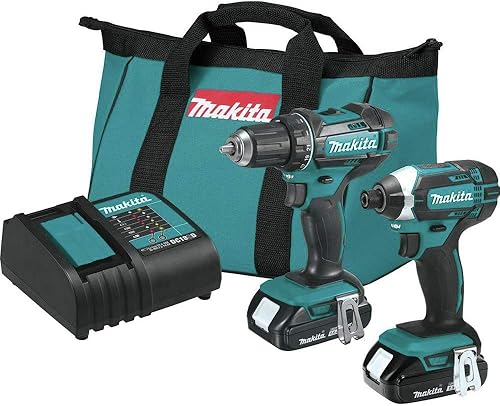
Makita CT225SYX 18V LXT Compact 2-Piece Combo Kit
8.5/10 our score
See it on Amazon -
3
 Best for light household jobs
Makita FD09R1 12V CXT 3/8 in. Driver-Drill Kit
8.3/10 our score
See it on Amazon
- 4
 Check it
Makita XFD15ZB 18V LXT Sub-Compact Brushless Driver-Drill (Tool Only)
Best for tight LXT spaces - 5
 Check it
Makita CT232 12V CXT Drill and Impact Driver Combo Kit
Best for compact CXT pairs - 6
 Check it
Makita XPH16Z 18V LXT Brushless Hammer Driver-Drill (Tool Only)
Best for occasional masonry - 7
 Check it
Makita XPH14Z 18V LXT Brushless Hammer Driver-Drill (Tool Only)
Best for demanding masonry - 8
 Check it
Makita XFD13 18V Brushless Drill Driver (Bare Tool)
Best for spare LXT tools - 9
 Check it
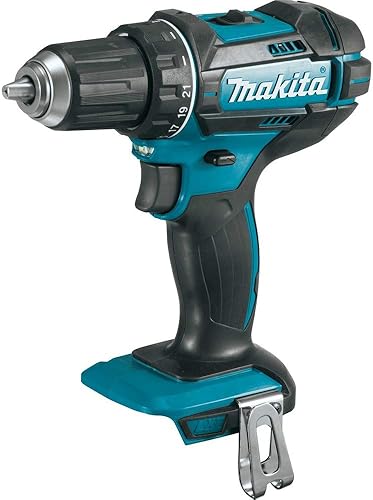
Makita XFD10Z 18V LXT Driver-Drill (Tool Only)
Best for simple LXT drilling
How we chose the best Makita cordless drills
The best Makita drill depends on your battery platform, the space you work in and whether you need hammer action or a second tool. We compared the stated features and kit contents, focusing on what helps you match the tool to the job.
A complete kit gives a new buyer a battery and charger along with the drill. A tool-only model can be a better fit if you already have compatible batteries, but CXT and LXT are separate platforms.
We included driver-drills and hammer driver-drills because they suit different work. A standard drill handles common holes and fasteners; a hammer model adds a setting for masonry.
Scores reflect each drill's features and setup in relation to the needs of someone searching for the best Makita drill. They are comparative judgments based on the product facts.
| Product | Best for | Platform | Motor | Included | Our score |
|---|---|---|---|---|---|
| Makita XFD131 18V LXT Brushless Driver-Drill Kit | new LXT buyers | 18V LXT | Brushless | 3.0Ah battery, charger and tool bag | 8.8 |
| Makita CT225SYX 18V LXT Compact 2-Piece Combo Kit | two-tool projects | 18V LXT | Two batteries, charger and tool bag | 8.5 | |
| Makita FD09R1 12V CXT 3/8 in. Driver-Drill Kit | light household jobs | 12V max CXT | Two 2.0Ah batteries, charger and case | 8.3 | |
| Makita XFD15ZB 18V LXT Sub-Compact Brushless Driver-Drill (Tool Only) | tight LXT spaces | 18V LXT | Tool only | 8.1 | |
| Makita CT232 12V CXT Drill and Impact Driver Combo Kit | compact CXT pairs | 12V max CXT | Two batteries, charger and tool bag | 8.0 | |
| Makita XPH16Z 18V LXT Brushless Hammer Driver-Drill (Tool Only) | occasional masonry | 18V LXT | Tool only | 7.9 | |
| Makita XPH14Z 18V LXT Brushless Hammer Driver-Drill (Tool Only) | demanding masonry | 18V LXT | Tool only | 7.8 | |
| Makita XFD13 18V Brushless Drill Driver (Bare Tool) | spare LXT tools | 18V LXT | Brushless | Bare tool | 7.6 |
| Makita XFD10Z 18V LXT Driver-Drill (Tool Only) | simple LXT drilling | 18V LXT | 4-pole | Tool only | 7.4 |
Which Makita drill is right for your work?
The XFD131 is the leading general pick because it pairs a brushless 18V drill with a battery and charger. The other options make more sense when you need a compact body, a combo kit, an existing-battery tool or hammer drilling.
Makita XFD131 18V LXT Brushless Driver-Drill Kit: Best for new LXT buyers
- Brushless motor
- 2-speed transmission
- 3.0Ah battery, charger and tool bag included
- 440 in.lbs. max torque
A brushless 18V drill kit with two speeds and the main pieces needed to start drilling and driving. Its included battery and charger make it a straightforward choice if you are new to LXT.
Pros
- Brushless motor
- Battery and charger included
- Two-speed transmission
Cons
- Larger than the sub-compact options
- Only one battery included
The XFD131 is the clearest choice if you want an 18V drill without assembling a kit piece by piece. Its brushless motor delivers up to 440 in.lbs. of max torque, and the two-speed transmission runs from 0–500 RPM or 0–1,900 RPM.
The box includes a 3.0Ah battery, charger and tool bag. This is a useful starter setup, though the kit includes one battery, so long sessions may call for a pause while it charges.
This drill suits regular home repairs, furniture assembly and general drilling where one tool must handle both holes and screws. Skip it if your main need is hammer drilling into masonry or if you already have a compatible LXT battery and charger.
For a drill with a chuck, choose a bit that matches the material and hole size, then tighten the chuck around the bit shank. Set a lower speed for driving screws and a higher speed for ordinary drilling, and start gently to keep the bit from wandering.
For help matching voltage, chuck size and features to a project, read our plain cordless drill buying guide. You can also compare broader options in our guide to cordless power drills for everyday jobs.
Choose the XFD131 if you need a ready-to-use LXT kit. If you already own compatible batteries and don't need a charger, compare its bare-tool alternative, the XFD13.
Makita CT225SYX 18V LXT Compact 2-Piece Combo Kit: Best for two-tool projects
- Driver-drill and impact driver
- Two 1.5Ah batteries
- Charger and tool bag included
- Compact tools
This kit pairs an 18V drill with an impact driver for buyers who want both tools in one set. It includes two batteries, a charger and a bag.
Pros
- Two tools for drilling and driving
- Two batteries included
- Compact designs
Cons
- The drill uses a brushed motor
- 1.5Ah batteries have less capacity than the XFD131 kit battery
The CT225SYX gives you a driver-drill and an impact driver in one 18V kit. The drill provides two speeds and up to 480 in.lbs. of max torque, while the impact driver is suited to fastening work.
Two 1.5Ah batteries, a charger and a tool bag are included. One battery can be in use while the other charges, although its capacity is smaller than the battery in the XFD131 kit.
Choose this set if your projects mix hole drilling with repeated screw or fastener driving. Skip it if you only need an occasional-use drill or already own a useful impact driver; the second tool and its battery system may add little value.
Use the drill for holes and delicate fasteners, and switch to the impact driver for longer or repeated fasteners when its driving action suits the job. Start each fastener slowly and keep the bit aligned to reduce cam-out and damage to the screw head.
See our cordless drill combo kit guide for more context on buying a drill and impact driver together. The CT225SYX is the right fit when you want both on Makita's 18V LXT platform.
Makita FD09R1 12V CXT 3/8 in. Driver-Drill Kit: Best for light household jobs
- 12V max CXT platform
- 3/8 in. chuck
- Two 2.0Ah batteries
- Charger and case included
A compact 12V drill kit with two batteries and a case. It fits buyers who value a smaller drill and don't need to share batteries with Makita's 18V LXT tools.
Pros
- Two batteries included
- Compact 7 in. design
- 2-speed operation
Cons
- Less torque than the 18V picks
- Separate platform from 18V LXT
The FD09R1 is a compact CXT kit for lighter drilling and fastening. It has a 3/8 in. chuck, two speeds from 0–450 to 0–1,700 RPM, and up to 250 in.lbs. of max torque.
The kit includes two 2.0Ah batteries, a charger and a case. Its 12V max CXT platform is separate from Makita 18V LXT, so check your current tools before choosing it for battery sharing.
This is a natural pick for small household projects where a compact drill and a complete kit matter more than the higher torque of the 18V options. Skip it if you expect to drill large holes often or want to use existing LXT batteries.
For better control, keep the drill straight and use the slower speed when starting a hole or driving a screw. If the bit binds, release the trigger, remove the bit safely and clear the material instead of forcing the motor.
Makita XFD15ZB 18V LXT Sub-Compact Brushless Driver-Drill (Tool Only): Best for tight LXT spaces
- 5-7/8 in. long
- Brushless motor
- Two speeds
- Battery and charger sold separately
This sub-compact brushless drill is sized for tight spaces and works with Makita 18V LXT batteries. It is a tool-only option, so check that you already have a compatible battery and charger.
Pros
- Short 5-7/8 in. body
- Brushless motor
- Uses 18V LXT batteries
Cons
- Battery and charger not included
- Less torque than the full-size hammer drills
The XFD15ZB is the short-body option for working between shelves, inside cabinets or in other tight areas. At 5-7/8 in. long, it combines an 18V LXT battery platform with a sub-compact brushless design.
It has two speeds, from 0–500 to 0–1,700 RPM, and up to 350 in.lbs. of max torque. The tool is sold without a battery or charger, so it makes the most sense if you already have compatible LXT batteries.
Choose it over the XFD131 when access and size matter more than getting a full kit. Skip it if you need a battery, charger or case in the same purchase, or expect the highest torque and hammer mode for demanding work.
Its compact shape can make it easier to position, but it doesn't remove the need for a clear line of approach. Before drilling, check that the chuck and bit can reach the mark without the tool body hitting a shelf or wall.
Makita CT232 12V CXT Drill and Impact Driver Combo Kit: Best for compact CXT pairs
- 12V max CXT drill and impact driver
- Two 1.5Ah batteries
- Charger and tool bag included
- Compact tools
The CT232 combines a compact CXT drill with an impact driver, plus two batteries, a charger and a bag. Consider it if you want a coordinated small-platform set.
Pros
- Drill and impact driver together
- Two batteries included
- Compact 12V tools
Cons
- Not compatible with LXT batteries
- 1.5Ah batteries are smaller than the FD09R1 kit batteries
The CT232 pairs a 12V CXT drill with an impact driver for buyers who want two compact tools. The drill offers two speeds and up to 250 in.lbs. of max torque, while the impact driver is intended for driving and fastening.
It includes two 1.5Ah batteries, a charger and a tool bag. Like the FD09R1, it belongs to the CXT platform, so it won't use 18V LXT batteries.
Pick it when you want a small drill and a dedicated driver in one purchase. Skip it if you only need a drill; the FD09R1 includes larger-capacity batteries and a case, and the extra driver may go unused.
For common assembly tasks, reserve the drill for pilot holes and precise work, then use the impact driver for suitable fasteners. Keep the battery charged and swap it before the tool slows under load.
Makita XPH16Z 18V LXT Brushless Hammer Driver-Drill (Tool Only): Best for occasional masonry
- Hammer, drill and driving modes
- Brushless motor
- 970 in.lbs. max torque
- Battery and charger not included
A compact brushless hammer drill for buyers who need hammer action for masonry as well as ordinary drilling and driving. The battery and charger are separate.
Pros
- Hammer function for masonry
- Brushless motor
- Compact 6-7/8 in. design
Cons
- Tool only
- Higher torque may be more than routine home tasks require
The XPH16Z adds hammer mode to a compact 18V LXT brushless drill. Its stated maximum torque is 970 in.lbs., and its two-speed design covers drilling, driving and hammer applications.
This is a tool-only model, with no battery or charger included. Hammer action can help with masonry holes, but you still need a suitable masonry bit and must match the tool to the material and task.
Choose it if you need a compact hammer drill and already own LXT batteries. Skip it if your work is limited to wood, metal and routine screwdriving; the XFD131 kit is a simpler match for those jobs.
Before starting masonry work, mark the hole and hold the drill square to the surface. Use steady pressure rather than leaning hard on the tool, and stop if the bit overheats or the hole begins to wander.
For occasional holes in brick, compare the task and bit with our guide to drilling into brick. For concrete work, start with how to drill into concrete with a hammer drill.
Makita XPH14Z 18V LXT Brushless Hammer Driver-Drill (Tool Only): Best for demanding masonry
- Hammer, drill and fastening applications
- 1,250 in.lbs. max torque
- Up to 31,500 BPM
- Battery and charger not included
The XPH14Z is the higher-torque hammer drill here, with a 2-speed transmission and a stated hammer rate of up to 31,500 BPM. Choose it for demanding drilling and masonry work, not as a simple kit.
Pros
- Highest stated torque in this group
- Hammer function for masonry
- All-metal self-ratcheting chuck
Cons
- Tool only
- May be more drill than basic fastening needs
The XPH14Z is the high-torque hammer drill in this group, with up to 1,250 in.lbs. of max torque and a stated hammer rate up to 31,500 BPM. Its two-speed transmission reaches 2,100 RPM in the higher setting.
It is a tool-only model, so plan for a compatible LXT battery and charger. Choose it when masonry drilling and demanding drilling or fastening are regular parts of the job; skip it if you need a simple starter kit or won't use hammer mode.
The all-metal self-ratcheting chuck is designed to grip bits securely. Still, check the bit before each job and tighten the chuck properly, especially after changing from a masonry bit to a standard drill bit.
For a one-off hole in brick, this drill may be more tool than you need. Use our brick drilling guide or concrete hammer drill guide to plan the bit and technique for the material.
Makita XFD13 18V Brushless Drill Driver (Bare Tool): Best for spare LXT tools
- Brushless motor
- Two speeds
- 440 in-lb max torque
- Battery, charger and case not included
This bare-tool XFD13 offers brushless drilling and two speeds for someone who already owns a compatible LXT battery. It overlaps with the XFD131 kit, so compare whether you need the included battery and charger.
Pros
- Brushless motor
- Two-speed transmission
- Compatible with several LXT 18V battery models
Cons
- No battery, charger or case
- Less useful if you are starting a battery platform
The XFD13 bare tool is another brushless 18V LXT driver-drill with two speeds and up to 440 in-lb of max torque. Its main advantage over the XFD131 kit is that you can buy the drill alone when you already have batteries and a charger.
The bare-tool package does not include a battery, charger or case. Check your battery model for compatibility before buying, especially if you have tools from Makita's 12V CXT line.
Choose it if you own compatible LXT batteries and want a brushless drill without duplicate kit parts. Skip it if you are starting from scratch; the XFD131 includes the battery and charger needed to begin.
The XFD13 overlaps closely with the XFD131 in drill performance, so make your decision around the kit contents. A bare tool is only a saving if you can use the batteries and charger you already have.
Makita XFD10Z 18V LXT Driver-Drill (Tool Only): Best for simple LXT drilling
- 4-pole motor
- Two speeds
- 480 in.lbs. max torque
- Battery and charger not included
The XFD10Z is a straightforward 18V driver-drill with two speeds and a 4-pole motor. It makes the most sense if you already have LXT batteries and want a basic tool-only drill.
Pros
- Two-speed transmission
- 480 in.lbs. max torque
- Dual LED lights
Cons
- Battery and charger not included
- Not brushless
The XFD10Z is a basic 18V LXT driver-drill with a 4-pole motor, two speeds and up to 480 in.lbs. of max torque. It also has dual LED lights and a rubberized soft grip.
This tool-only model is not brushless and does not include a battery or charger. It suits buyers who want a straightforward drill and already have a compatible LXT battery.
Choose it if you value a simple tool-only drill and don't need a brushless motor. Skip it if you need a complete kit; the XFD131 offers a brushless motor and includes a battery, charger and bag.
A work light helps in a dim corner, but it doesn't replace good lighting or a clear view of the mark. Keep the bit clean, wipe dust from the tool after use, and store the drill and battery dry in their case or bag.
How do you choose between Makita CXT and LXT drills?
Choose CXT for a compact 12V kit and LXT if you own Makita 18V tools or want an 18V option. The platforms are separate, so choosing one sets which batteries you can share with compatible tools.
The FD09R1 and CT232 use CXT batteries. The XFD131, CT225SYX, XFD15ZB, XPH16Z, XPH14Z, XFD13 and XFD10Z use LXT batteries.
A compact 12V kit can cover routine repairs without the size of a larger drill. LXT offers more choices in this roundup, including brushless drills and hammer models.
Don't assume that batteries with the same brand name fit every Makita drill. Check the platform and battery compatibility before buying a bare tool, then consider whether the kit includes a charger and enough batteries for your work.
Do you need a Makita hammer drill for brick or concrete?
You need hammer mode when you want a drill with a hammering action for masonry holes. For wood, metal and common screwdriving, a standard driver-drill is usually the more direct choice.
Both hammer drills here are tool-only models. The XPH16Z offers a compact hammer-drill setup, while the XPH14Z has the higher stated torque and hammer rate.
Hammer mode doesn't make every drill right for every masonry job. Use an appropriate bit, follow the tool instructions and let the drill and bit do the work without forcing them.
For a small number of holes in masonry, think about the material and how often you'll repeat the work before choosing a dedicated tool. For frequent concrete drilling, read our guide to using a hammer drill at home.
What should you check before buying a Makita drill?
Check the battery platform and included items first. A tool-only drill can be a good fit for an existing LXT setup, but a new buyer may need a battery and charger as well.
Next, decide whether you need a standard drill or hammer drill. Hammer mode is useful for masonry work, but adds little for basic assembly or routine drilling in wood.
Then match the drill's size and capabilities to your typical jobs. Compact models are easier to position in tight spaces; extra torque and hammer action can suit demanding work, but aren't needed for every household task.
A few common buying mistakes are easy to avoid:
- Mixing up CXT and LXT: check your current battery platform before selecting a tool-only drill.
- Buying a bare tool without a battery plan: confirm you already own a compatible battery and charger, or account for both as separate purchases.
- Paying for a second tool you won't use: a combo kit is useful when you regularly drill and drive, but a single drill may be enough for occasional repairs.
- Choosing hammer mode for every material: use a standard drill for ordinary wood and metal work, and reserve hammer action for suitable masonry tasks.
- Ignoring the bit and speed: choose a bit for the material, secure it in the chuck and begin slowly to keep the hole controlled.
How do you set up and care for a Makita drill?
A good setup starts with the right battery, bit and mode for the job. Check the tool's instructions before use, especially when changing modes or drilling masonry.
Fit a compatible charged battery, then open the chuck enough to seat the bit straight. Tighten the chuck firmly, select the right speed and mode, and make sure the bit tip meets the marked spot before you pull the trigger.
For screwdriving, start with a low speed and light trigger pressure so you can keep the bit aligned. For drilling, hold the tool steady, let the bit cut at its own pace and clear debris when needed.
After a job, remove the battery before changing bits or cleaning the drill. Wipe dust from the tool, keep the chuck and vents free of debris, and store the battery and tool in a dry place.
Avoid forcing a stuck bit or continuing when the tool becomes unusually hot. Stop, disconnect the battery, check the bit and material, and allow the tool to cool before continuing.
Which Makita drill should you choose?
Choose the XFD131 if you want a ready-to-use brushless LXT kit, the CT225SYX if you need a drill and impact driver together, or the FD09R1 if a compact 12V drill kit fits your work. For an existing LXT battery set, consider the XFD15ZB for tight spaces or one of the hammer drills for masonry.
If you need the best Makita drill for frequent masonry and demanding work, compare the XPH16Z's compact form with the XPH14Z's higher stated torque and hammer rate. For a wider brand comparison, read our guides to the best Milwaukee cordless drills and the best Bosch cordless drills, then weigh your existing battery system before choosing.
Our top 3 picks at a glance
-
1
Best for new LXT buyers
Makita XFD131 18V LXT Brushless Driver-Drill Kit
8.8/10 our score
See it on Amazon -
2
Best for two-tool projects
Makita CT225SYX 18V LXT Compact 2-Piece Combo Kit
8.5/10 our score
See it on Amazon -
3
Best for light household jobs
Makita FD09R1 12V CXT 3/8 in. Driver-Drill Kit
8.3/10 our score
See it on Amazon
Frequently asked questions
Which Makita cordless drill is best for most home users?
The XFD131 is the easiest all-around choice here because it includes an 18V brushless drill, a 3.0Ah battery, a charger and a tool bag. If you already own LXT batteries, a tool-only drill may cost less to equip, while smaller jobs may suit a 12V CXT kit.
Should you choose a Makita 12V CXT or 18V LXT drill?
Choose 12V CXT when a compact drill kit fits your routine and you want included batteries. Choose 18V LXT if you already own that battery platform or want an 18V option.
CXT and LXT batteries belong to separate platforms.
Do Makita cordless drills include a battery?
Some picks here are complete kits, while the XFD15ZB, XPH16Z, XPH14Z, XFD13 and XFD10Z are tool-only or bare-tool models. Check the included items before buying, and make sure you have a compatible battery and charger if they aren't included.
Do you need a Makita hammer drill for brick or concrete?
A hammer drill adds a hammering action for masonry, while a regular driver-drill is meant for drilling and fastening without that mode. For brick, see our guide to drilling into brick with a cordless drill.
For concrete, read how to drill into concrete with a hammer drill.
Can you use a Makita impact driver as a drill?
An impact driver is mainly for driving fasteners, though it can drill with the right hex-shank bit. It is not a direct replacement for a drill with a chuck.
Our guide to using an impact driver as a drill explains where it works and where it falls short.